
70 lines
5.3 KiB
Markdown
70 lines
5.3 KiB
Markdown
---
|
||
source_url: "https://www.malwarebytes.com/blog/news/2026/05/signal-users-targeted-in-backup-stealing-phishing-attacks"
|
||
ingested: 2026-06-30
|
||
sha256: fb345e305901cc1ff4d00b52da3d97a36e07e25e6adabee577d5b0aa188c1359
|
||
discovered_from:
|
||
platform: discord
|
||
channel_id: "1477793137064935675"
|
||
channel_name: "tw"
|
||
message_id: "1521566444683268138"
|
||
author_id: "1477793167486226708"
|
||
posted_at: "2026-06-30T17:21:49.750000000Z"
|
||
message_excerpt: "Signal Backup Recovery Key 注意喚起: recovery keys and backups phishing/security operations context."
|
||
---
|
||
|
||
A new phishing campaign is targeting Signal users by attempting to steal their backup recovery keys to access encrypted message archives.
|
||
|
||
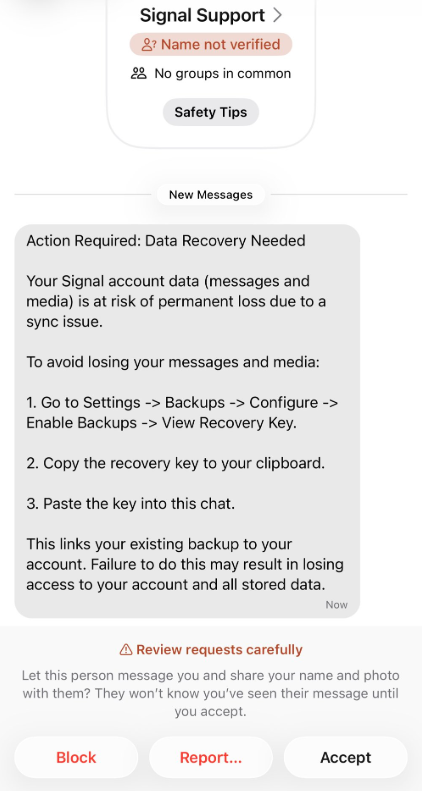
The attack is initiated by a text message pretending to come from Signal Support.
|
||
|
||
|
||
|
||
Phishing message pretending to come from Signal support
|
||
|
||
> “Action Required: Data Recovery Needed
|
||
> Your Signal account data (message and media) Is at risk of permanent loss due to a sync issue.
|
||
> To avoid losing your messages and media:
|
||
> 1\. Go to Settings -> Backups -> Configure -> Enable backups -> View Recovery Key.
|
||
> 2\. Copy the recovery key to your clipboard.
|
||
> 3\. Paste the key into this chat.
|
||
> This links your existing backup to your account. Failure to do this may result in losing access to your account and all stored data.”
|
||
|
||
There are a few red flags in this message:
|
||
|
||
- The “Name not verified” label under the sender
|
||
- Repeated threats of losing all your data
|
||
- Pasting the key into the chat. Signal Support would never ask for your recovery key
|
||
|
||
---
|
||
|
||

|
||
|
||
### Scam or legit? Scam Guard knows.
|
||
|
||
---
|
||
|
||
The attack exploits Signal’s Secure Backups feature, which allows users to store encrypted archives of their conversations on Signal’s servers. These backups are protected by a 64-character recovery key.
|
||
|
||
That key should never leave the user’s device and is never shared with Signal’s servers. If hackers obtain this key and gain control of a victim’s account, they can download and decrypt the entire message history.
|
||
|
||
For an attacker, that’s even better than hijacking an account, which would only give them access to future messages.
|
||
|
||
For now, the attacks appear to be targeted. We have seen reports from [journalists, reports of attacks on Chinese activists](https://x.com/joshrogin/status/2059634806648930614), and warnings from a [researcher who investigates cyberattacks against journalists, dissidents, and human rights activists](https://techcrunch.com/2026/05/28/hackers-are-trying-to-steal-signal-users-backups-in-new-wave-of-phishing-attacks/). But now that other cybercriminals are aware of this opportunity, the tactic could spread rapidly.
|
||
|
||
## How to stay safe
|
||
|
||
Signal explicitly states that it will never reach out to users first and will never request registration codes, PINs, or recovery keys.
|
||
|
||
- **Treat unsolicited messages from “Support” as suspicious by default.** Legitimate support for apps like Signal and WhatsApp do not ask you, in a chat message, to send back verification codes, PINs, or passwords. If you receive a warning about account problems, do not follow links in the message. Open the app’s settings directly or visit the official website through other means.
|
||
- **Never share any secret codes, [multi-factor authentication keys](https://www.malwarebytes.com/cybersecurity/basics/2fa), or app PINs.** SMS codes are there to prove that you control a phone number. Anyone who has the code can pretend to be you. App‑specific PINs or passcodes are there to protect account changes. Consider anyone asking for them to be a scammer.
|
||
- **Use the extra security features these apps offer.** Enable options like [registration lock](https://support.signal.org/hc/en-us/articles/360007059792-Signal-PIN#manage_registration_lock), registration PIN and device‑change alerts so that your account cannot be silently re‑registered without an extra secret. Store your PIN in a password manager instead of choosing something easy to guess or reusing a code. This reduces the risk of social engineering or [shoulder‑surfing](https://en.wikipedia.org/wiki/Shoulder_surfing_\(computer_security\)).
|
||
- **Another useful feature is [disappearing messages](https://support.signal.org/hc/en-us/articles/360007320771-Set-and-manage-disappearing-messages).** Short‑timer and disappearing messages reduce how much content is available if an attacker gains access to a chat later, or obtains long‑term access to a device or backup. They are not a complete solution, but they can limit the damage.
|
||
- **Use [Malwarebytes Scam Guard](https://www.malwarebytes.com/solutions/scam-guard) on your device or online to check messages.** Malwarebytes Scam Guard identified this message as a phishing attempt and provided further information about how to proceed.
|
||
|
||
---
|
||
|
||
**Scammers know more about you than you think.**
|
||
|
||
Malwarebytes Mobile Security protects you from phishing, scam texts, malicious sites, and more. With real-time AI-powered Scam Guard built right in.
|
||
|
||
[Download for iOS →](https://www.malwarebytes.com/ios) [Download for Android →](https://www.malwarebytes.com/android)
|