
100 lines
3.7 KiB
Markdown
100 lines
3.7 KiB
Markdown
---
|
|
source_url: "https://vercel.com/changelog/run-multiple-frameworks-in-one-project-with-vercel-services"
|
|
ingested: 2026-07-01
|
|
sha256: 0ad2bffeb7a78a490f38bc0202e1095a8489a01804f96f214e5777414f5ed639
|
|
discovered_from:
|
|
platform: discord
|
|
channel_id: '1028287639918497822'
|
|
channel_name: 'chat'
|
|
message_id: '1521868662993064179'
|
|
author_id: '890908900520505354'
|
|
posted_at: '2026-07-01T13:22:44.210000000Z'
|
|
message_excerpt: 'Direct #chat link from toymaker to Vercel Services changelog for multiple framework services in one project.'
|
|
---
|
|
|
|
You can now deploy multiple frontends and backends together within a single Vercel project.
|
|
|
|
[Vercel Services is now available](https://vercel.com/blog/vercel-services-run-full-stack-on-vercel), allowing you to deploy full stack apps with multiple frameworks on a shared domain, where services talk to each other privately and deployments build, preview, and roll back together.
|
|
|
|
Services are defined in `vercel.json`:
|
|
|
|
```json
|
|
{
|
|
"services": {
|
|
"my_frontend": {
|
|
"root": "frontend/",
|
|
"framework": "nextjs"
|
|
},
|
|
"my_backend": {
|
|
"root": "backend/",
|
|
"entrypoint": "main:app"
|
|
}
|
|
},
|
|
// my_backend has no public route
|
|
// it is only reachable from my_frontend internally
|
|
"rewrites": [
|
|
{
|
|
"source": "/(.*)",
|
|
"destination": { "service": "my_frontend" }
|
|
}
|
|
]
|
|
}
|
|
```
|
|
|
|
Vercel handles routing, builds, and environment variables automatically.
|
|
|
|
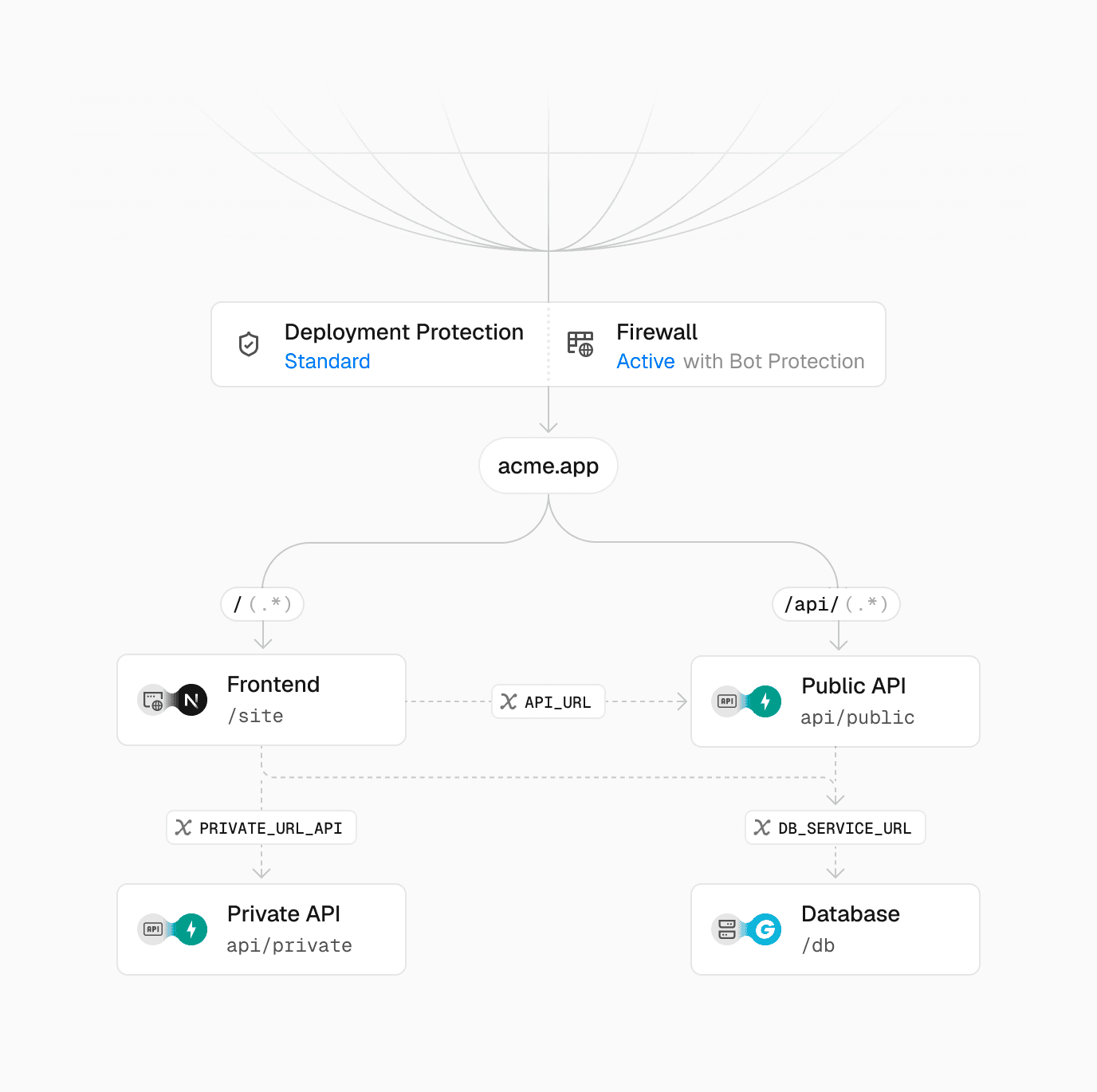
From there, your services show up across the dashboard and CLI:
|
|
|
|
- The Deployments panel visualizes the services graph
|
|
- The Logs UI filters by individual service
|
|
- `vercel dev` runs every service locally for a production-like environment
|
|
|
|
|
|
|
|
A visualization of Services Graph in the Deployment UI
|
|
|
|
### Service bindings
|
|
|
|
Services talk to each other internally with the new `bindings` key, without routing through the public internet:
|
|
|
|
```json
|
|
{
|
|
"services": {
|
|
"my_frontend": {
|
|
"root": "frontend/",
|
|
"framework": "nextjs",
|
|
"bindings": [
|
|
{
|
|
"type": "service",
|
|
"service": "my_backend",
|
|
"format": "url",
|
|
"env": "BACKEND_INTERNAL_URL"
|
|
}
|
|
]
|
|
},
|
|
"my_backend": { ... }
|
|
},
|
|
"rewrites": [ ... ]
|
|
}
|
|
```
|
|
|
|
The binding exposes my\_backend to my\_frontend as an environment variable.
|
|
|
|
The frontend reaches the backend privately through the URL in `BACKEND_INTERNAL_URL`:
|
|
|
|
```typescript
|
|
export async function GET() {
|
|
const url = new URL("/users", process.env.BACKEND_INTERNAL_URL);
|
|
const res = await fetch(url);
|
|
const users = await res.json();
|
|
return Response.json(users);
|
|
}
|
|
```
|
|
|
|
The route fetches from my\_backend using that variable and returns the response.
|
|
|
|
### Framework-defined infrastructure
|
|
|
|
Most frameworks run with zero configuration. [Framework-defined infrastructure](https://vercel.com/blog/framework-defined-infrastructure) means each service's framework is auto-detected and auto-provisioned, from FastAPI and Flask to Express and Hono, with first-class support for Go and Rust. Services run on [Fluid compute](https://vercel.com/fluid) with Active CPU pricing, so you only pay for the time your code is actually running.
|
|
|
|
Read the [documentation](https://vercel.com/docs/services) to get started. |